Saturday, 5 October 2013

'Value was either too large or too small for an Int16' in SharePoint 2010 Task Edit Form

Received the below custom error, while trying to approve the task from Task Edit Form page.

In our application, suddenly we received this custom error. Before that, application working fine and approvers are able to open the form and able to Approve/Reject the task.

In the highlighted code statement, a 32-bit integer is attempted to be converted to 16-bit integer, whereas the variable is of type 32-bit int. This breaks the rendition of custom task edit form, logs a warning in ULS and redirect to error page.


Error logged in ULS (attached):
Message: Value was either too large or too small for an Int16.
StackTrace:   
                at System.Convert.ToInt16(Int32 value)    
                at System.Convert.ToInt16(Object value)    
                at Project.SP.Pages.Layouts.TaskEditForm.GetTaskListInformation()
                at Project.SP.Pages.Layouts.TaskEditForm.Page_Load(Object sender, EventArgs e)

Int16 variables can hold the values from 0 to 32767.
But The task that fails on custom edit form has associated workflow id 33248.


Workflow instances are assigned IDs incrementally (may not be necessarily be sequentially). It must have exceeded 32767 recently, hence the custom form with that code blow out loading the page.

Code snippet:

//Get the parent List item Id
   this.parentListItemId = Convert.ToInt16(this.taskListItem[SPBuiltInFieldId.WorkflowItemId]);

Code fix:
//Get the parent List item Id
  this.parentListItemId = Convert.ToInt32(this.taskListItem[SPBuiltInFieldId.WorkflowItemId]);

Int32 variables can hold max values is : 2,147,483,647

Saturday, 21 September 2013

"The form cannot be submitted because of an error" in Approval Workflow

Using with Approval Workflow template i have created a workflow at Pages Library.
The problem i am having is when i add user to reviewer and CC people picker control and click on start to start the workflow it's showing me "The form cannot be submitted because of an error" error.
Initially all things were working and i was able to submit the workflow with Approvers and CC.

Solution 1:
Uninstall the update Security update for Info path 2010 (KB2553322) either 32 or 64bit for SharePoint Designer.
In my environment at control panel i didn't see this update.

Solution 2:
To verify the problem in SharePoint Designer, Site --> All Files --> _catalog --> wfpub --> Workflow Name (In my case 'Approval Workflow'). Open Approvalworkflow.xoml.wfconfig.xml and click on edit.
Here Search with xsi:nil="true" in XML code and check at WofkflowConfig --> Intitiation --> DefaultData --> dfs:myFields ---> dfs:dataFields --> <d:SharePointListItem_RW>
In my case i observed xsi:nil="true" at Assignee and CC. So Delete xsi:nil="true" in the Approvers and CC feilds 
<d:Approvers >
        <d:Assignment >
            <d:Assignee/>
            <d:Stage xsi:nil="true"/>
            <d:AssignmentType>Serial</d:AssignmentType>
        </d:Assignment >
    </d:Approvers xsi:nil="true"> <!-- instead it must be </d:Approvers> -->
    <d:ExpandGroups>true</d:ExpandGroups>
    <d:NotificationMessage/>
    <d:DueDateforAllTasks xsi:nil="true"/>
    <d:DurationforSerialTasks xsi:nil="true"/>
    <d:DurationUnits>Day</d:DurationUnits>
    <d:CC xsi:nil="true"/>        <!-- instead it must be <d:CC/> -->
    <d:CancelonRejection>false</d:CancelonRejection>
    <d:CancelonChange>false</d:CancelonChange>
    <d:EnableContentApproval>false</d:EnableContentApproval>
 Save and publish the workflow again. Now you will not see the error message.

Friday, 1 March 2013

SharePoint 2010 - How to Configure an Alternate Access Mapping

This is quick reference for how to give alternate access mapping to SharePoint site through central administration.
  • Alternate Access Mappings (AAM) is a feature of SharePoint that allows you to access your SharePoint site with another URL.
  • AAM will help you Without exposing the server name or port numbers. and it is common request in SharePoint administration is to add another URL to an existing site.
There are 3steps we need to do:
  1. Create a binging for the SharePoint site in IIS
  2. Create AAM in SharePoint Central Administration
  3. Add your domain in DNS entries and point the IP address to the SharePoint Server.

1. Create a binding for the SharePoint site in IIS:

    Edit the site bindings

            Start IIS manager -->Right-click the site and "edit bindings" or go for Actions in right panel then click on Bindings. --> Give your URL in In 'Host'.

2. Create AAM in SharePoint Central Administration
We had finished for IIS manager. Now we need to give the access from SharePoint too. Ensure that you should be a member of the Farm Administrators SharePoint group, to operate the Central Administration site. 
  • From Central Admin -->Application Management-->click on Configure alternate access mappings under Web Applications.
  • Edit the alternate access mapping
  • Choose the correct "alternate access mapping collection" at the top right Choose "Edit Public URLs" Add the new URL for the zone which you want. (ex: Internet)


3. Add your domain in DNS entries and point the IP address to the SharePoint Server

    Now you’ll have to switch over to your DNS server.
  1. Within the DNS Management Console : Add a new Primary Zone with your new domain name.       
  2. Add a new Host to the records and point the IP Address to the SharePoint server.
Now you can have Alternate URLs pointing to your SharePoint Site Collection or whatever you’d like.

Wednesday, 1 August 2012

How to change Add New item Link in sharepoint 2010

Type -1:

To customize the SharePoint 2010 List 'Add New Item link' Please add the below JavaScript in your list AllItems.aspx page.

All webparts will have their own ID's. So you will have to modify the Custom List webpart with the webpart ID.
Please see this link for detailed information about ID's of Webparts.


Edit the page using with SharePoint Designer. and find the ID="PlaceHolderMain" and add the JavaScript before the end tag "</asp:conten>".

Here is the jscript
<script>
var ttnA = document.getElementsByTagName('A');
for (var j=0; j<ttnA.length; j++)
{
  if (ttnA[j].id == 'idHomePageNewItem')
  {
      { ttnA[j].innerHTML='Add your Request from here' }
  }
}
</script>


Type - 2:

To change 'Add New Item' text for Lists or Libraries from SitePages(Some times List webparts may use in SitePages depends on requirement.)

For SP2010,   
  • Using with SharePoint Designer open the 'AllItems.aspx' or 'SitePages/Page.aspx' (Particular List webpart located page) .
  • Go for the Design portion of the List View section and click on the '>' portion where you see 'Add new item'
  • Then click on Hyperlink options and click yes when the Dialog box comes up.

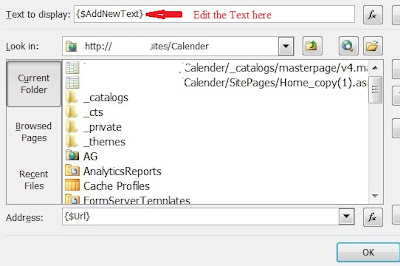
  • At the top you will see 'Text to display: {$AddNewText}'  Edit the text here to whatever you want for example 'Add your Request here'
 

Monday, 2 July 2012

Export SharePoint ListItem to PDF file

Before one month this one is my major task, i did much research about this area. But i didn't found any links about to Print the SharePoint ListItems based on conditions. Finally got the output using with the iTextSharp library. It is a free downloadable library that is use for pdf generation with ListItems or any data.
Here is the steps i followed,
  • Here i wrote the code for below requirement :
    "I need to export the SharePoint List Item, Picture & its Barcode image with Barcode value.
    My intention is when user click on the item link the pop up window of DispForm.aspx page will appear with 'Export to PDF' button in top left. So user will click the button then PDF file will be genrate."

  • First you should download iTextSharp dll files from here
  • you must create a SharePoint project in VS 2010, and add this(itextsharp.dll) reference to the project.
  • Then create a visual webpart with any name, here i am giving ExportItemtoPDF and add a button in design page.
Make sure use the following namespaces in your code
using Microsoft.SharePoint;
using System.IO;using Microsoft.SharePoint.WebControls;using iTextSharp.text;using iTextSharp.text.pdf;using System.Text;namespaces will genrate like as below


Please add the below code in button click event.
try
{
using (MemoryStream ms = new MemoryStream()) {
//Opening the current site
SPSite oSiteCollection = SPContext.Current.Site;
//Fetching the current list
SPList oList = oSiteCollection.OpenWeb().Lists["PrintListItem"];
// Creae the document object, assigning the page margins
Document document = new Document(PageSize.A4, 25, 25, 30, 30);
PdfWriter writer = PdfWriter.GetInstance(document, ms);

// Open the document, enabeling writing to the document
document.Open();PdfContentByte cb = writer.DirectContent;
//barcode
Barcode128 bc = new Barcode128();

//Giving heading to the Word Document with style
StringBuilder strHTMLContent = new StringBuilder();
strHTMLContent.Append(SPContext.Current.Item["Title"].ToString());
strHTMLContent.Append("\r\n" + SPContext.Current.Item["body"].ToString()); strHTMLContent.Append("\r\n" + SPContext.Current.Item["value"].ToString());
imagefilepath = SPContext.Current.Item["Picture"].ToString().Replace(",", "").Trim();
iTextSharp.text.Image jpg = iTextSharp.text.Image.GetInstance(imagefilepath);jpg.ScaleToFit(120, 80);

string code = SPContext.Current.Item["Barcode Value"].ToString();
bc.ChecksumText = true;
bc.GenerateChecksum = true;
bc.StartStopText =true;
bc.Code = code;

document.Add(new Paragraph(System.Text.RegularExpressions.Regex.Replace(strHTMLContent.ToString(), @"<(.|\n)*?>", string.Empty)));
document.Add(bc.CreateImageWithBarcode(cb, null, null));
document.Add(jpg);

document.Close();
writer.Close();
ms.Close();
Response.ContentType = "pdf/application";
string strFileName = SPContext.Current.Item["Title"].ToString() + ".pdf";
Response.AddHeader("content-disposition", "attachment;filename=" + strFileName);
Response.OutputStream.Write(ms.GetBuffer(), 0, ms.GetBuffer().Length);
}
}

catch(Exception ex){
}

This is the output


I tried with Barcode 39 type but i am getting special characters in the end of barcode value. I need to find more informatin about using Barcode 39 type in SharePoint.

Please check this link to Export SharePoint List items to Word Document.
I used above link, but i am not able Export the Barcode Image. Getting the Image Path and Value only.

For complete discussion about my issue please have a look  in MSDN forums.

Wednesday, 27 June 2012

How to find Site Collection size in SharePoint 2010

To get the Size (in MB) of all Site collections in your SharePoint 2010 Farm

You can use STSADM commands and Powershel script.

STSADM Cmd:

Please navigate to below path

C:\Program Files\Common Files\Microsoft Shared\Web Server Extensions\14\BIN
and type as    STSADM.exe -o enumsites -url htt:// SharePoint Site

check for detailed information here


2. By using with PoweShell script
Open SharePoint 2010 Management Shell as administrator

---> $sc = Get-SPSite http://sharepointsite/
---> $sc.usage
this will give you the output like as below


If you want to know about the storage of Site Collection only then use the below script

Get-SPSite | select url, @{label="Size in MB";Expression={$_.usage.storage/1MB}} | Sort-Object -Descending -Property "Size in MB" | Format-Table -AutoSize

the above script will give you the site collection size in megabytes.


If you want a copy of site collections size properties in html file, then please use below script

Get-SPSite | select url, @{label="Size in MB";Expression={$_.usage.storage/1MB}} | Sort-Object -Descending -Property "Size in MB" | ConvertTo-Html -title "Site Collections sort by size" | Set-Content SizeReport.html

to overcome the yellow color warning message please use the parameter as -Limit ALL

Get-SPSite -Limit ALL | select url, @{label="Size in MB";Expression={$_.usage.storage/1MB}} | Sort-Object -Descending -Property "Size in MB" | ConvertTo-Html -title "Site Collections sort by size" | Set-Content SizeReport.html

For find out storage space allocation's and Increase Storage please check with below links FYI.,
http://blogs.msdn.com/b/sowmyancs/archive/2008/11/15/how-to-find-out-the-storage-space-allocation-details-a-site-through-code.aspx
http://social.technet.microsoft.com/forums/en-US/sharepointadmin/thread/d6cb11d9-6ed2-4344-aac9-4ca72d8b2c40
http://blogs.officezealot.com/mauro/archive/2005/03/25/4425.aspx
http://sharepointyankee.com/2011/12/28/how-much-storage-space-is-my-site-collection-using/